Most password managers solve one problem well. They store usernames and passwords securely.
But your digital life is not just usernames and passwords.
You deal with:
- Bank accounts
- Credit cards
- Passports and IDs
- Subscriptions and memberships
- Utility accounts
- Devices and licenses
None of these fit naturally into a username and password format. And that is exactly where most password managers start to break down.
The Problem with Secure Notes
When something does not fit into a predefined template, most tools push you into a secure note.
What you expect
- Structured fields
- Clean layout
- Easy scanning
What you get
- A blank textbox
- Manual typing
- No structure
Over time, your vault becomes a collection of unstructured text.
You can store anything. But you cannot manage it properly.
HexaVault's Approach: Templates
HexaVault starts with a simple idea.
Every entry is a set of label and value pairs. A template is a predefined list of labels.
- Bank Account: account number, IFSC, branch, account holder name,...
- Credit Card: card number, expiry, CVV, bank name, limit, statement date, ...
- Passport: passport number, name, issue date, expiry date, ...
- Domain: registrar, purchase date, expiry date, auth code, ...
You do not have to think about what to store. The structure is already there.
Templates for Real Life
HexaVault includes more than 40 templates designed for real-world use.
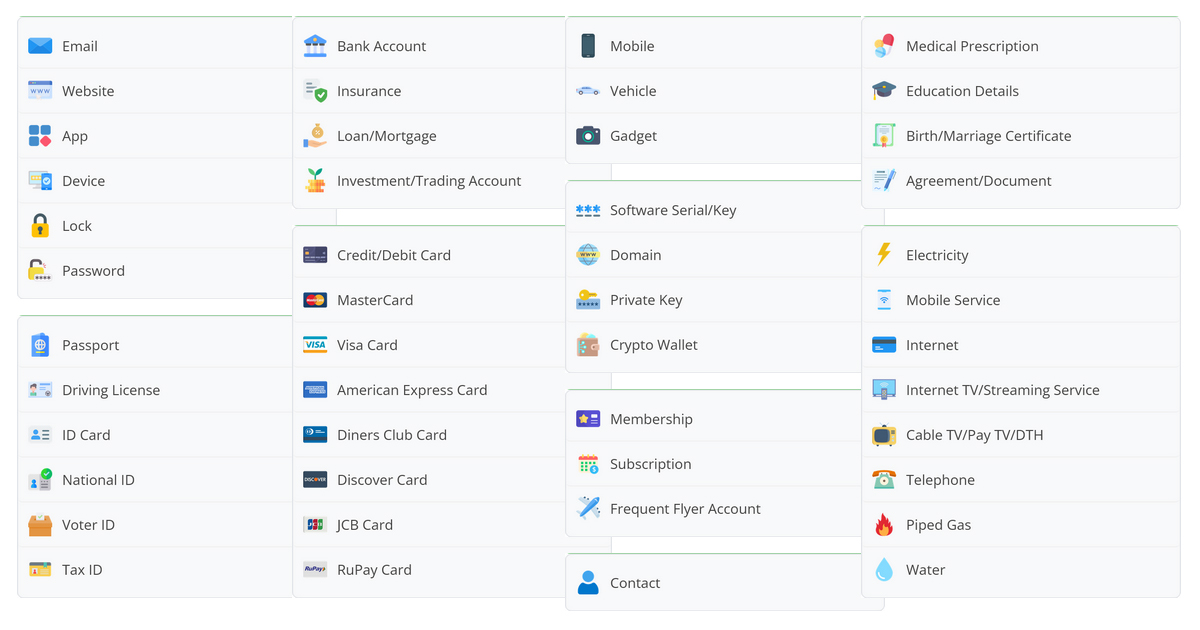
Digital
- Website
- App
- Password
Identity
- Passport
- Driving License
- National ID
- Tax ID
Financial
- Bank Account
- Cards
- Loans
- Investments
Utilities
- Electricity
- Internet
- Mobile
- Gas
This is not just password storage. It is structured storage for your entire life.
Icons and Visual Identity
Every template in HexaVault comes with a predefined icon. You can also choose from hundreds of available icons and customise entries as needed.
This might seem like a small detail, but it makes a significant difference once your vault starts growing.
- A passport entry looks like a passport
- An ID card looks like an ID card
- A degree certificate looks different from a bank account
- A frequent flyer account stands out from a subscription
Instead of reading text line by line, you start recognising things visually. You scan, not search.
Most password managers either do not support icons or rely on website favicons. That works for logins, but not for offline information like documents, financial records, or memberships.
HexaVault treats icons as part of the structure. They are not decoration. They are a way to quickly identify what you are looking for.
Reordering Fields
Templates give you structure, but HexaVault does not lock you into a fixed layout.
You can reorder fields within any entry. Move important information to the top, group related fields together, and arrange things in a way that makes sense to you.
Most password managers enforce a predefined order. Template fields appear in one section, custom fields in another, often separated and harder to follow.
HexaVault removes that constraint. Everything is part of the same list, and you control the order.
This small capability makes entries easier to read, easier to maintain, and much closer to how you actually think about your data.
The Bigger Picture
Password managers have trained users to think small.
HexaVault is built for something bigger.
If all you need is password autofill, your browser already does that.
If you want structure, clarity, and control over your entire digital life, that is where HexaVault fits in.